



Most Shopify merchants don't set out to build a support bottleneck. It just happens. A few hundred orders a month turns into a few thousand, and suddenly your inbox is full of people asking where their package is, how to return a sweatshirt, or whether they can still cancel an order they placed twelve minutes ago.
These are completely reasonable questions. They're also completely predictable — and that's the point. If you already know what your customers are going to ask, there's no reason every one of those questions needs to land in someone's inbox and wait for a reply.
That's the core idea behind a self-service portal: give customers a way to answer their own questions, on their own schedule, without needing your team to be involved. It sounds simple because it is. But a lot of Shopify stores still don't have one — and they're paying for it in time, team morale, and customer frustration.
This article breaks down what a self-service portal actually does, why it matters more than ever heading into 2026, and how brands like HexTide are using Mech's built-in self-service tools to cut ticket volume without sacrificing the customer experience.
So, What Exactly Is a Self-Service Portal?
A self-service portal is a customer-facing tool that lets shoppers resolve common support requests on their own — things like tracking a shipment, starting a return, cancelling an order, or reporting a problem — without opening a ticket or waiting for a live agent.
In the context of Mech Helpdesk, the self-service portal lives directly inside the Live Chat widget that sits on your Shopify store. When a customer clicks to open it, they're not dropped into a chat queue. Instead, they see a clean "My Orders" view that pulls their recent order data directly from Shopify. From there, they can:
- Check their shipment status with live carrier tracking
- Initiate a return and choose their reason from a configurable list
- Submit a cancellation request before an order ships
- Report an issue — a wrong item, a damaged product, a late delivery — and flag it with their carrier info already attached
- Update their shipping address directly from within the widget
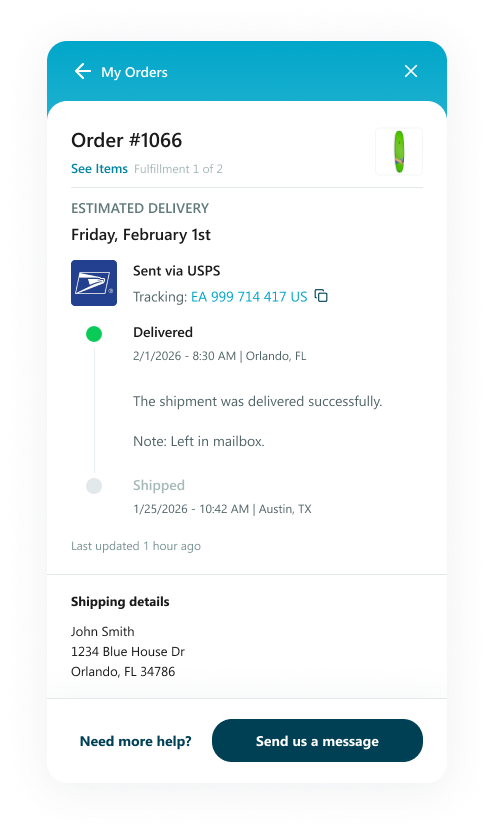
What makes this different from a basic FAQ page is context. The portal knows who the customer is (via their email login), knows which orders belong to them, and serves up the right options based on what's in front of them. There's no copy-pasting order numbers. No digging through confirmation emails. The customer sees their orders, taps the relevant action, and gets a resolution — or a clear path to one.
Why Ticket Volume Keeps Climbing (Even as You Improve)
Here's the counterintuitive part: ticket volume tends to grow right alongside a store's success. More customers means more orders, and more orders means more questions — about delivery windows, return policies, wrong sizes, delayed packages.
The most common category of all these tickets? "Where is my order?" — usually abbreviated in the industry as WISMO. These are tickets where the customer just wants a tracking update. No problem to solve, no decision to make. They just want to know if their package is on the way.
"Where is my order?" inquiries account for a significant portion of all ecommerce support tickets — estimates from Shopify ecosystem studies put WISMO at 20–40% of total support volume for most DTC brands. For stores during peak seasons like BFCM, that percentage climbs even higher.
The frustrating thing about WISMO tickets isn't that they're hard — it's that they're unnecessary. The tracking information already exists in Shopify. Your support agent isn't adding any value by looking it up and pasting it into a reply. They're just acting as a middleman between data that's already there and a customer who needs it.
A self-service portal eliminates that middleman entirely.
The Real Cost of Not Having One
Let's say your store handles 500 tickets a month and 30% of them are WISMO or basic order status questions. That's 150 tickets your team fields that could, in theory, never exist. If each ticket takes an average of 4 minutes to resolve, that's 10 hours of agent time per month spent on questions customers could've answered themselves in 30 seconds.
That math gets worse at scale. But the cost isn't just time — it's also about customer experience. A shopper who has to wait 4–6 hours for a response to a simple tracking question isn't necessarily going to leave a bad review, but they're not going to feel great about your brand either. Compare that to a customer who opens the chat widget, logs in, taps "Track," and sees their package is out for delivery — that interaction takes 15 seconds and leaves them feeling in control.
According to a widely cited Salesforce research report on customer expectations, 61% of customers prefer to resolve issues through self-service before reaching out to a live agent. The caveat? That preference disappears quickly if the self-service experience is confusing or incomplete. The bar isn't just "have a portal" — it's "have a portal that actually works."
That distinction matters. Plenty of stores have a FAQ page that technically qualifies as "self-service" but doesn't answer specific order questions, can't pull live data, and requires the customer to navigate away from wherever they are in the store. That kind of friction often sends people straight back to the support inbox anyway.
How HexTide Uses Mech's Self-Service Portal
HexTide is an eCommerce brand that installed Mech Helpdesk through the Shopify App Store. Before the self-service portal, their support team was handling a high volume of order status and return requests through live chat and email — a lot of which were straightforward, predictable questions that kept agents from focusing on more complex issues.
After enabling Mech's self-service portal alongside Live Chat, HexTide's setup works like this: when a customer opens the chat widget, they see an option to manage their orders directly. Customers who want to track a shipment or request a return can do so without ever starting a conversation. Those who do need help — because their issue is more complex or they'd just rather talk to someone — still have full access to live chat.
One feature HexTide's customers use frequently is the ability to update a shipping address directly through the portal. Rather than emailing support with a correction, customers can submit the change themselves — with built-in validation that flags issues like PO Box entries before they cause a fulfillment problem.
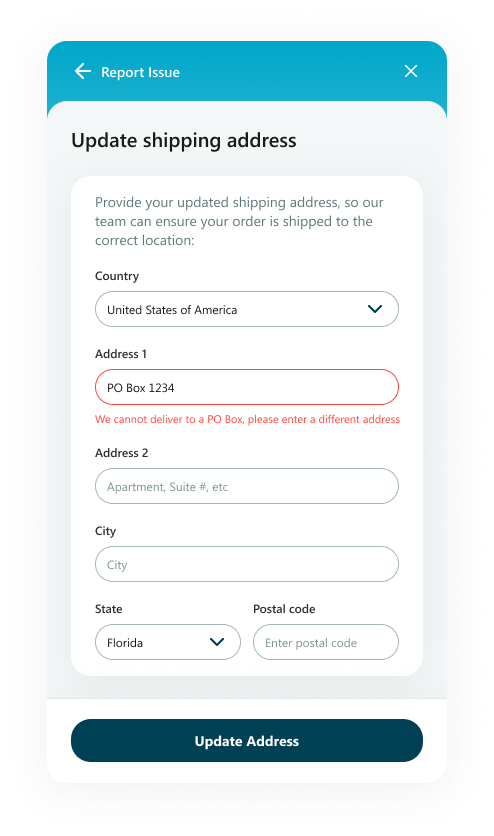
The result is a cleaner support workflow on both sides. Customers who can self-serve do. Agents get to focus on conversations that genuinely require a human response. And the portal keeps HexTide's order data, return flows, and issue reports organized in one place rather than scattered across different tools.
HexTide also takes advantage of Mech's Loop Returns integration, which means customers who initiate a return are automatically routed to the Loop portal — no manual handling required on the merchant side.
What Merchants Can Actually Customize
One thing worth knowing: Mech's self-service portal isn't a rigid template. Merchants have meaningful control over how it behaves, which matters a lot for brand consistency.
Inside the Mech settings dashboard, you can:
- Toggle individual sections on or off (returns, cancellations, issue reporting, etc.)
- Customize the labels and button text customers see
- Configure the list of return reasons and cancellation reasons
- Choose between a self-managed return flow or redirect to Loop Returns if that integration is connected
- Preview every change in real time before it goes live, using the same widget design your customers will see
The live preview is a small thing, but it's genuinely useful. You can see exactly how the portal looks — on the actual widget, not a mock-up — before toggling anything live. It makes configuration feel much less risky for merchants who aren't technically inclined.
A Note on AI and Where Self-Service Fits
There's a lot of noise right now about AI agents resolving support tickets automatically. It's real, and it's valuable — but it's a different layer of the stack. AI agents are particularly good at answering questions that require some nuance: explaining a product, helping a customer pick the right size, or handling an unusual return scenario.
Self-service portals handle structured, predictable tasks — checking a tracking number, submitting a standard return — where the outcome is already defined. These two tools complement each other rather than compete. In a well-built support setup, the self-service portal handles the volume and the AI or live agents handle the complexity.
Zendesk's 2024 Customer Experience Trends report found that support teams using self-service tools alongside AI deflect significantly more tickets than teams using either approach alone — and that the combination has the highest positive impact on customer satisfaction scores.
For Shopify merchants who aren't ready to invest in a full AI agent setup, the self-service portal is often the more immediate win. It requires less configuration, handles a predictable slice of your ticket volume, and pays off quickly in time saved.
Getting Started With Mech's Self-Service Portal
If you're already using Mech Helpdesk, the self-service portal is available in your settings under Self-Service Portal — no additional plan required. You can enable it in minutes and start with just the sections that are most relevant to your store. Most merchants start with order tracking and returns, then add issue reporting once they're comfortable with the flow.
If you're not yet on Mech, the portal is part of the core product available when you install through the Shopify App Store. Setup is designed to be fast — you connect your store, the portal pulls your order data automatically via Shopify's API, and you're off.
The goal isn't to replace every support interaction. Some conversations genuinely need a human. But the ones that don't? Your customers will be happier handling those themselves — and your team will be glad they did.
Ready to cut your ticket volume? Install Mech Helpdesk on the Shopify App Store and enable your self-service portal today.